




MicroScan SCADA – Data Logging and SCADA Software

Brand:

$0.00

Package Type *

comes with License and USB Dongle

comes with License and USB Dongle

Add ons

PLC Text Box*

Moving to a larger package and/or modules combination? contact us for pricing.
Total: $0.00

All prices are in NZ$, and GST exclusive and are subject to change without notice.

Product Details

MicroScan is a complete Windows based Supervisory Control and Data Acquisition software product, meeting the demands of both the industrial and research environments.

By customer acclaim, MicroScan is the price-performance leader for SCADA packages. Operating on the most popular multi-tasking platform ensures flexibility and conformity to industry standards to serve your current needs, while being ready to expand when you are.

Developed around a multi-tasking modular concept you can choose the exact system to meet your needs, then add new modules as your process grows.

MicroScan is known to be the best feature packed Recorder module for gathering valuable data, while the powerful Mimic module provides screens (MMIs) which give the operator direct plant control.

Continuous development places MicroScan in the leading position as a bench mark upon which other packages are measured.

MicroScan opens a whole new world of power and innovation previously unavailable to industrial users. Like a window into your plant, MicroScan is a proven money saver and money earner, as all the plant problems are discovered and solved, which greatly increases your efficiency.

Modules:

  • Recorder Module
  • Mimic Module
  • Controller Module
  • PLC Interface Module
  • Tool Box Module
  • Network Module

Recorder Module

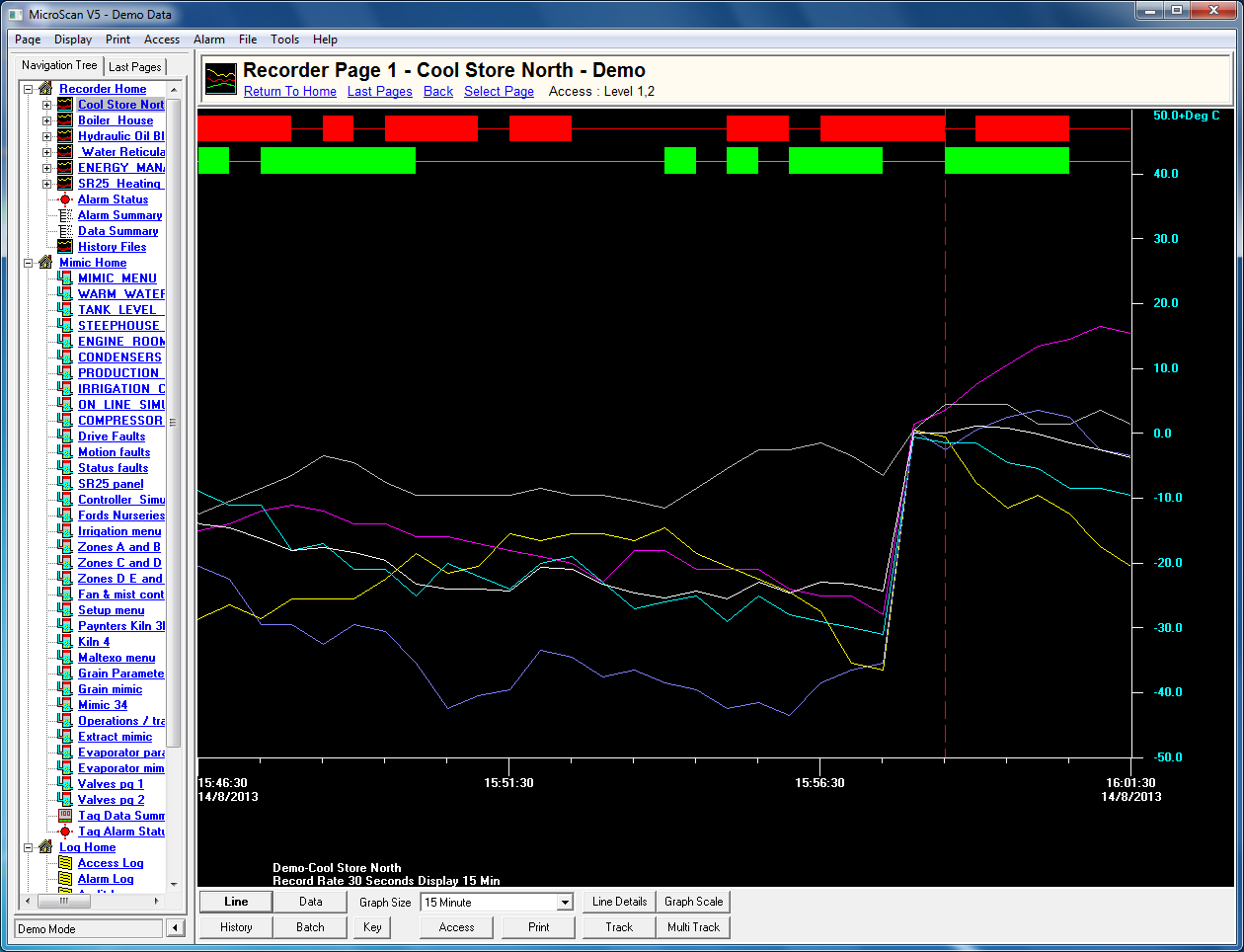
The recorder module is a vital component to any SCADA system as it represents the data acquisition component. The visual displays can switch between the data (spreadsheet) format and the line (trend graph) format to group and display information instantaneously and historically with on screen viewing as far back as you want to go.

The features include comprehensive alarming, totalising, printouts, report generation and an operator notepad with time and date stamping. The recorder also supports linking to other software modules to further extend the reporting and control capabilities.

Recorder Key Features:
  • Trends Screen
    • Multicoloured display for analogue and digital
    • Track display gives pointed values
    • Adjustable graph scale and time base
    • Zoom support
    • High Speed logging
    • Automatic logs and graphs
  • History screen
    • Searching for historical data made easy
    • Export to wordprocessor or spreadsheet
    • Easy slow playback
  • Data screen
    • Data screen configurable fonts
    • Easy to read real time data
    • Colour highlighting of alarms
    • Historical relay support
  • Data screen calibration
    • On-line calibration and ISO tracking support
    • Configurable screen area for
      • Daily and grand totalisers
      • Daily and grand minimum and maximum values
      • 24 hour average
      • Alarms count and duration times
  • Function keys
    • Configurable screen formats
    • Toolbar support
    • Multi level access
    • Help screens and function key support
  • Alarm screen
    • Alarm status window
    • Configurable to automatically appear on alarm
    • Alarms filed to disk or event log
    • Full annunciation support
    • Configurable automatic alarm printing
    • Easy access to alarm set points after access obtained
  • Printing features
    • Automatic and manual log and graph printouts
    • Automatic alarm logs of batch printing
    • Comment printing and setup printout

Mimic Module

The Mimic module is the software equivalent to a hard-wired control panel offering comprehensive operator interfacing to your process control requirements.

The Mimic has 50 screens, each of which can be set up as a pictorial depiction of a section of the factory, to display objects showing process variables and the operating status of the plant equipment. Now we add command buttons and switches to control set points and operate your equipment.

You can start to see the potential of the Mimic Package when communicating to PLC’s with screen update times configurable up to half a second (now that is fast!). This must be the most effective way to interface and control your process.

When you add all this to the Recipe features and DDE support, this makes for total process control at your fingertips.

MMI Key Features:
  • Mimic screens (MMI)
    • Easy to use and configure
    • User definable layout using windows, paint, CAD etc.
    • Data can be inserted on screen where required
    • Display interacts with mouse commands
    • Buttons and hotspots drive outputs automatically
  • Mimic features
    • Static and flashing alarm windows
    • Configurable page menu or index
    • Page directories to focus on process areas
    • Interactive displays include
      • Digital displays
      • Bar graphs – vertical and horizontal
      • Tank colour filling to show level
      • Control panels
      • Colour change on alarm
  • Flexibility
    • Design and application of Mimics is unlimited
  • PLC support
    • Strong PLC support made easy
    • Software interfaces available for most popular PLC’s
  • Controller support
    • Strong field controller support
    • Full controller support of all variables
    • Support of auto tuning PID and intelligent ramp controllers
    • Controllers configured from screen
    • Complete pattern programming and saving to disk
    • All controller variables available for trending
    • Built-in on/off controllers

Controller Module

PLC Interface Module

  • Allows communication between PLC’s and Recorder/Mimic modules.
  • Note: Check with Intech engineers to ensure that the interface is available for the PLC to be used.

Tool Box Module

  • Data transfer.
  • Mathematical formulas.
  • Passwords.
  • Audit tracking.
  • Step controller.
  • Time clock.
  • Data average & min/max.
  • Time functions.
  • Data base.
  • Time clocks.
  • Other special functions:
    • e.g. relative humidity.
    • cylindrical tank volume.
    • list – look-up table.
    • rate of change

Network Module

The sharing of data between the active and passive computer nodes running MicroScan, is supported on both the Novell file server styled network, and the Windows multiple independant server network.

For Sites with more than one active computer node, data can be shared between active computer nodes. Also passive computer nodes have access to data from any active computer node.

Passive computer nodes can be run continuously or simply started when required to provide the latest run time data or view historical information. Security is provided to regulate the sharing of data.

  • The ability to store files on a file server computer instead of the local computer to which the field hardware is connected.
  • More than one computer can store files on the file server, these files can be picked up by any computer on the network with MicroScan installed.
  • Price for the network module does not include the Network itself.
  • Data file duplication for security.
  • The Network should be installed and successfully running Windows before installing the MicroScan package.

DDE – Dynamic Data Exchange:

MicroScan supports Dynamic Data Exchange (DDE) and Dynamic Link Library (DLL) communication for customised user applications. The INDDE module allows tailor-made report generation modules or specialised controller modules to be written in either Visual Basic, Visual C++, Excel or Lotus, and then run alongside the SCADA to perform specialised tasks created to meet your exact requirements.

These features add to the scope of your process monitoring needs and is the ideal development tool for truly innovative management solutions. This software can link you to the heart of your process, and now with your imagination, the sky is the limit.

Example of Field Hardware Connections:

Software

Download MicroScan SCADA Software.

Documents